Alert Triage
Alert Triage
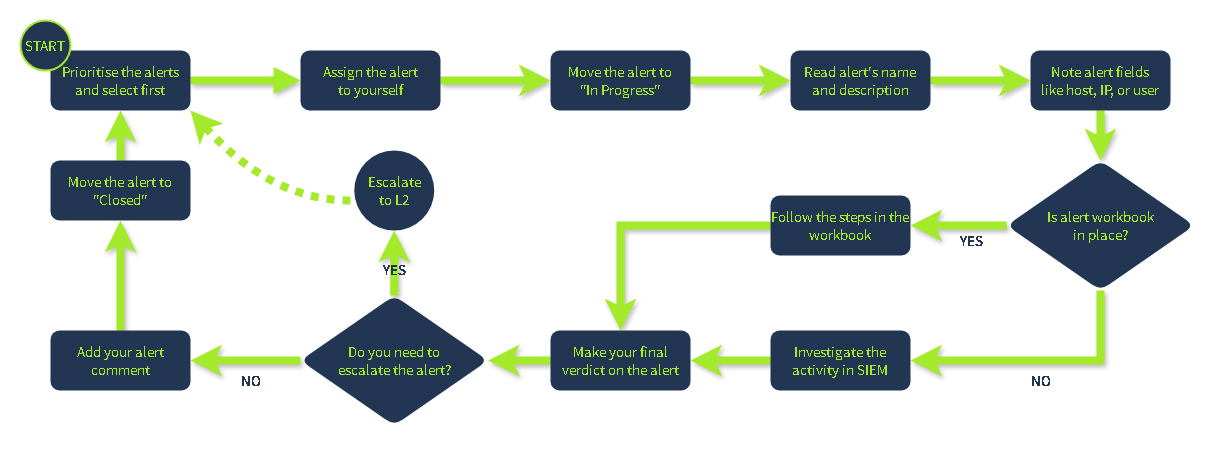
Initial Actions
Take ownership of the assigned alert and avoid interfering with alerts being handled by other analysts, and confirm that you are fully prepared to proceed with the detailed investigation. You achieve it by first assigning the alert to yourself, moving it to In Progress, and then familiarising yourself with the alert details like its name, description, and key indicators.
Investigation
This is the most complex step, requiring you to apply your technical knowledge and experience to understand the activity and properly analyse its legitimacy in SIEM or EDR logs. To support L1 analysts with this step, some teams develop Workbooks (also known as playbooks or runbooks) - instructions on how to investigate the specific category of alerts. If workbooks are not available, below are some key recommendations:
- Understand who is under threat, like the affected user, hostname, cloud, network, or website
- Note the action described in the alert, like whether it was a suspicious login, malware, or phishing
- Review surrounding events, looking for suspicious actions shortly after or before the alert
- Use threat intelligence platforms or other available resources to verify your thoughts
Final Actions
Your decisions here determine whether you found or missed the potential cyberattack. Some actions like Escalation or Commenting will be explained in the following rooms, so don't worry if they sound complex right now. First, decide if the alert you investigated is malicious (True Positive) or not (False Positive). Then, prepare your detailed comment explaining your analysis steps and verdict reasoning, return to the dashboard and move it to the Closed status.
Checking VirusTotal of the file hash is a must.
Alert Triaging
When multiple alerts appear, analysts should have a consistent method to assess and prioritise them quickly. There are many factors you can consider when triaging, but these are the fundamental ones that should always be part of your process of identifying and evaluating alerts:
| Key Factors | Description | Why It Matters? |
|---|---|---|
| Severity Level | Review the alert's severity rating, ranging from Informational to Critical. | Indicates the urgency of response and potential business risk. |
| Timestamp and Frequency | Identify when the alert was triggered and check for related activity before and after that time. | Helps identify ongoing attacks or patterns of repeated behaviour. |
| Attack Stage | Determine which stage of the attack lifecycle this alert indicates (reconnaissance, persistence, or data exfiltration). | It gives insight into how far the attacker may have progressed and their objective. |
| Affected Asset | Identify the system, user, or resource involved and assess its importance to operations. | Prioritises response based on the asset's importance and the potential impact of compromise. |
- Severity: How bad?
- Time: When?
- Context: Where in the attack lifecycle?
- Impact: Who or what is affected?
They form a balanced foundation that's simple enough for analysts to apply quickly but comprehensive enough for informed decisions.
After reviewing these factors, decide on your next step: escalate to the incident response team, perform a deeper investigation, or close the alert if it's confirmed to be a false positive. A structured triage process like this helps ensure that time and resources are focused on what truly matters.
After Identifying Alerts
- Investigate the alert in detail.
Open the alert and review the entities, event data, and detection logic. Confirm whether the activity represents real malicious behaviour. - Check the related logs.
Examine the relevant log sources. Look for patterns or unusual actions that align with the alert. - Correlate multiple alerts.
Identify other alerts involving the same user, IP address, or device. Correlation often reveals a broader attack sequence or coordinated activity. - Build context and a timeline.
Combine timestamps, user actions, and affected assets to reconstruct the sequence of events. This helps determine if the attack is ongoing or has already been contained. - Decide on the following action.
If there are indicators of compromise, escalate to the incident response team. Investigate further if more evidence or correlation is needed. Close or suppress if the alert is a confirmed false positive, and update detection rules accordingly. - **Document findings and lessons learned.
**Keep a clear record of the analysis, decisions, and remediation steps. Proper documentation strengthens SOC processes and supports continuous improvement.